Forum Replies Created
-
AuthorPosts
-
adminKeymaster
The plugin status may be seen from the My Account page on the plugin’s website and also from the ACTIVATED FORMS tab of the plugin on your WP installation.
We are contacting your mail server directly to rectify the issue. We have never sent – and will never send – spam email messages. It’s possible there is a different account sharing the same IP address, nonetheless, we expect to resolve the issue with them very soon.
Again, you have our sincere apologies for the renewal issue. Let us know if we can be of any assistance as we remain at your service.
adminKeymasterWe have confirmed your server is blocking mail from our server.
host mx1.emailsrvr.com [184.106.54.1]
SMTP error from remote mail server after RCPT TO:
554 5.7.1 ACL dns_rbl; Client host [67.20.55.90] blocked using sa-ip4tset.blagr.emailsrvr.com=127.22.0.2 Senderscore.We are investigating the issue and also sending credentials to you through Gmail.
We remain at your service.
adminKeymasterYou have our sincere apologies for the renewal issue! We have extended the activation key through the weekend to provide time to renew the account.
According to our records, the renewal emails were sent to the email address you referenced. Please check the spam folder and we’ll check the email logs for any block or bounceback replies.
We have reset your password and tested the credentials here.
Check your email (and spam) and reply if not received.We were able to access the account. Select renewal from the menu on the left here and you’ll be able to renew the license with increasing discounts for multiple years.
Again, you have our sincere apologies, it is our goal to be at your service, and never a hindrance.
We remain at your service.adminKeymasterYou cannot reassign the form with DUPLICATE, you must recreate the field map layout as explained in the 2nd reply above.
You have our sincere apologies for the confusion, we remain at your service.
adminKeymasterRegarding #2, after rereading your question, our reply must be updated to include How To Automatically Create Field Map Layouts. Our reply was to map a 2nd similar PDF to the same Formidable Form.
The different (2nd) Formidable Form would need to be mapped to the PDF, not sure how we would automate something like that. However, we have automated creating Field Map Layouts which significantly reduces the time and required effort.
Follow these steps to automatically generate the field map layout…
-
Use copy/paste to rename the PDF fields to match the Formidable field names (or key) EXACTLY.
Select the “Enable automated layout creation for new field maps” on the plugin’s SETTINGS tab.
When a new field map layout is created the plugin will automatically map the fields, except ADDRESS, CHECKBOX (Radio Buttons if not setup correctly), and REPEATABLE fields, which must be mapped manually.We remain at your service.
adminKeymaster1. Select the Field Map Layout you want to delete, scroll to the bottom of the field map layout and click the DELETE button.
2. Select the Field Map Layout you want to duplicate, scroll to the bottom of the field map layout and click the DUPLICATE button.Let us know if we did not answer your questions or you need further assistance as we remain at your service.
We remain at your service.
adminKeymasterAn email with the invoice attached has been sent to the two addresses on file, info@ and thomas@.
We remain at your service.
adminKeymasterLet’s troubleshoot the field map layout.
Confirm that the submission emails are received, and there is no .txt file attached?
Also, provide the following screenshots;
1. DASHBOARD → FORMIDABLE PRO2PDF → EXPORT → select Form & Field Map → SCREENSHOT all settings and the first field mapping.2. DASHBOARD → FORMIDABLE → select form settings → ACTIONS & NOTIFICATIONS → SCREENSHOT entire page
Or, complete this form to have us log in and take a look.
We remain at your service.
adminKeymasterPRO2PDF does not create QR codes, however, you may upload a QR code as an image.
Our new plugin, E2Pdf, does create QR codes.
We remain at your service.
adminKeymasterThe license expired on June 8th. You can renew the activation key by logging in to the account here with the email address ****@ausbilderschein24.de which allows for multi-year discounts or purchase a new license for one year.
If purchasing a new license, simply replace the license key on the plugin’s “Activated Forms” tab.
We remain at your service.
June 22, 2021 at 10:33 am in reply to: There was an error generating the PDF file – This activation code is not valid. #36515adminKeymasterSometimes this error can be a generic error and not have anything to do with the activation code.
It’s likely an error with the Field Map Layout attempting to merge something that is incompatible with the plugin.
Reply using this form and attach a screenshot of the complete Field Map Layout (Export tab with the Formidable Form, Dataset, and Field Map Layout selected) so we may review the issue.
Or use this form to provide login credentials so that we may test the installation ourselves.
If you want to reply here on the forum, please reply to your original support thread here.
We remain at your service.
adminKeymasterCORRECTION: The only account we find under the email address expired in 2020. Please provide the order ID for the 30-day trial version.
We remain at your service.
adminKeymasterUse this form to send us a screenshot of the Activated Forms tab and of the Field Map Layout with your Form and Layout selected.
Or, if possible, provide login details so we may check the installation ourselves.
We remain at your service.
adminKeymasterSend the screenshot to support AT formidablepro2pdf DOT com
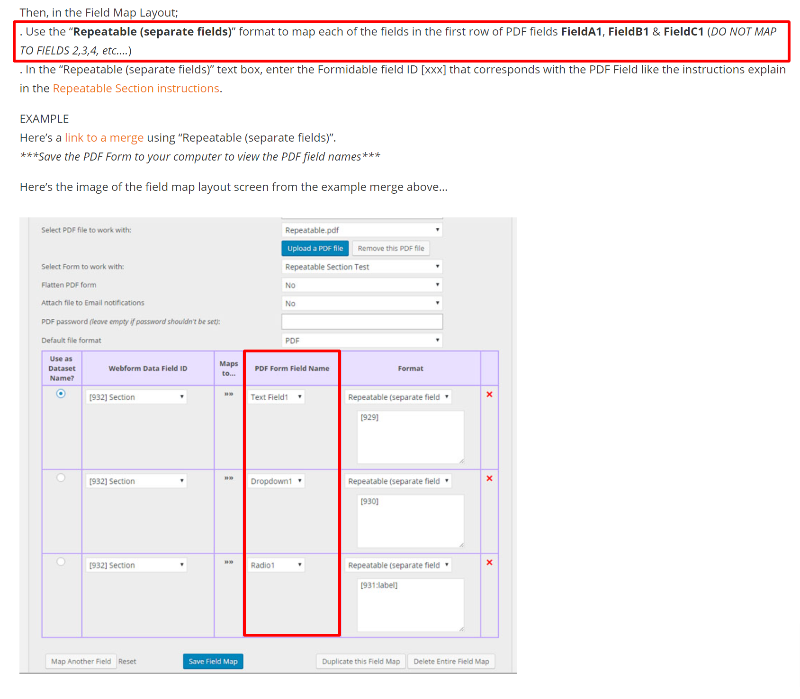
If the screenshot is the same as the above, then you MUST remove all mappings EXCEPT the mappings to PDF fields then end with a 1. ONLY map the 1s, not the 2s or 3s etc… the plugin will do that automatically.
We remain at your service.
adminKeymasterProvide an image of the field map layout so we may be more specific.
We remain at your serivce.
adminKeymasterConfirmed, format=currency should work, let us know if you run into any issues.
Also, it appears you first replied without logging in and the system flagged it and the rest as spam. We’ll look into the forum glitch.
We remain at your service.
adminKeymasterFor repeatable fields, you must ONLY map the 1st row/group of fields (All fields with a 1 at the end) the plugin will automatically populate the repeating fields that end with 2,3,4,5…
We will double-check the formatting options and reply again.
We remain at your service.
adminKeymasterAssuming this is the post and testing a reply.
June 10, 2021 at 2:10 pm in reply to: Need support and support page no longer accepts new posts #36371adminKeymasterYour post worked here, can you provide a link to the page where you had issues submitting a post?
You may also send an email to support AT formidablepro2pdf DOT com
We remain at your service and look forward to assisting you.
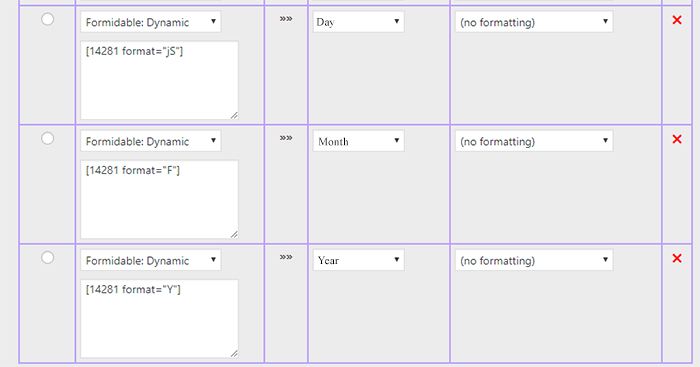
adminKeymasterUse the Formidable:Dynamic option found at the bottom of the “Webform Data Field ID” dropdown on the field map layout, see below…
 adminKeymaster
Map the PDF time field to the FORMIDABLE: DYNAMIC option, then enter
[xxx format="g:i a"]into the textbox below, where xxx is a field key from the form.Use the date format options on this page to adjust the output. Let us know if you need more assistance.
We remain at your service.
- This reply was modified 5 years, 3 months ago by admin.
adminKeymasterOur apologies for the delay!
Use these instructions to change the time/date field to any format style… and let us know if you need further assistance.
We remain at your service.
adminKeymasterCorrect, the instructions and the downloadable example both include the information.
 adminKeymaster
Change the dataset parameter to dataset=[id] and all will work as expected as shown on the demo video at this time mark.
Let us know if you have any further questions or need help creating a merge. Thank you for using PRO2PDF!
We remain at your service.
adminKeymasterChange the dataset parameter to dataset=[id] and all will work as expected as shown on the demo video at this time mark.
Let us know if you have any further questions or need help creating a merge. Thank you for using PRO2PDF!
We remain at your service.
-
AuthorPosts